Modern computational fluid dynamics (CFD) workflows look the same on paper and are good at addressing a defined problem out-of-the-box. You generate the mesh, define your boundary conditions, adjust the operating conditions and solver settings, and run your case to get your results. In practice, real engineering problems rarely stop there and require users to push beyond standard workflows to hit a target condition, not just run to a nominal point. For example, you might want to:
-
-
Converge to target lift by adjusting inputs like angle of attack during the run to match wind tunnel conditions.
-
Drive prescribed rotational motion or forced oscillations of a component to extract dynamic derivatives.
-
Couple aerodynamic moments to rigid-body rotational motion using simple structural models.
-
In these cases, fixed inputs are often not what define the engineering condition of interest. What matters is the outcome. Without in-run coupling, matching a target lift, thrust, or motion profile becomes an external iteration loop around the solver: run, measure, adjust, rerun. This works, but it is slow, fragile, and difficult to scale, especially when validating against experimental testing.
For these classes of problems, having a controlled way to customize solver behavior during the run is not a nice-to-have. It is often the difference between a workflow that is practical and one that is not.
How Flexcompute enables solver customization with UDD
Flow360 exposes this customization capability through User-Defined Dynamics (UDD). Instead of treating the solver as a fixed black box, UDDs provide you with an intuitive way to implement custom control laws and coupled physics.
UDD is designed to operate alongside the CFD solver and provide a feedback loop where flow solution quantities influence simulation parameters in real-time. Meaning you are no longer limited to prescribing static inputs and hoping the outputs line up with your target condition. The simulation can actively drive itself toward the condition you care about.
This allows Flow360 to handle a broader class of problems such as active control concepts, rigid body motion, and adaptive motion or boundary behavior, while preserving the robustness and performance of the core solver for standard workflows.
Overview of User-Defined Dynamics (UDD)
At a high level, UDDs introduce a feedback loop between the flow solution and user-defined logic. You can think of it in three parts:
-
-
Read from the flow solution: Input variables extract quantities from the flow field such as forces, moments, pressure coefficients, or BET disk variables. These values are computed from the current flow solution and made available to your dynamics system
-
Update internal state variables: State variables evolve according to mathematical expressions defined by the user. These update laws can depend on the current state, flow inputs, constants, and simulation variables such as time step size.
-
Compute output variables that modify the simulation: Output variables are computed from the updated state and directly modify simulation parameters. This is what closes the loop.
-
All of this is encapsulated in a single User Defined Dynamic configuration, keeping the coupling logic explicit and traceable within the simulation setup.
How UDD’s work in practice: a quick walkthrough
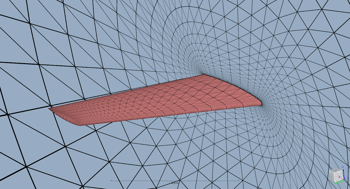 We will walk through an example of how you can use UDD’s in a workflow. Consider a common aerodynamic task: automatically adjusting angle of attack (AoA) to maintain a target lift coefficient. This is useful for validation workflows, where matching lift is more meaningful than prescribing a fixed angle of attack.
In this case, UDDs implement a simple proportional-integral (PI) controller that runs alongside the Flow360 solver to manipulate the AoA to achieve a constant given lift coefficient.
Within the full Python script, we will add a UDD that will ‘search’ for a specified AoA for which the lift coefficient of the wing is a certain value, in this case 0.4. The PI controller will update the value of the alpha variable in each pseudo step.
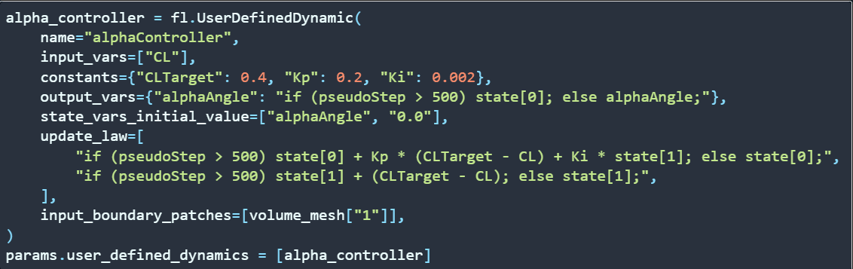
At each pseudo-step, the controller reads the lift coefficient computed on the wing surfaces. This defines the current condition the controller responds to. The difference between the target lift coefficient and the current lift coefficient is used to update internal state variables. These state variables provide the memory needed for proportional and integral response. The controller can be gated to activate only after the flow has partially converged, avoiding early-time transients.
The updated controller state is mapped to the global angle of attack. This closes the loop. The evolving flow solution influences the controller, and the controller directly modifies the simulation input. During the run, Flow360 executes the UDD logic alongside the solver. Afterward, the controller history and flow outputs can be inspected to confirm that angle of attack and lift coefficient converge smoothly to the target condition.
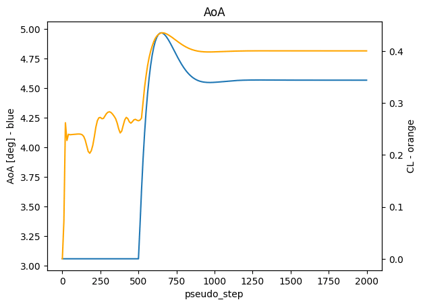
This same pattern extends naturally to more advanced use cases, such as driving rotation rates, matching thrust or mass flow targets, or coupling aerodynamic loads to rigid body motion. The key idea is that the feedback relationship is expressed directly within the simulation, rather than managed externally through repeated reruns.
The value UDD provides for real engineering workflows
The primary value of User-Defined Dynamics is not customization for its own sake. It is the ability to drive your solution to a target within a single CFD run.
In practice, this changes how CFD is used in real world workflows:
-
-
You can converge to target performance metrics directly, rather than approximating them through outer-loop reruns.
-
You can reproduce experimental conditions more faithfully by matching the quantities that were controlled or measured in tests.
-
You can model coupled behavior and motion in a way that would otherwise require external co-simulation or manual intervention.
-
You reduce friction in building aero databases and validation datasets, where hitting consistent conditions across many runs matters.
-
UDDs provide a clean way to move beyond static inputs and into simulations where the system responds to the flow as it evolves.
There is also a broader signal here for advanced users. A solver that supports this level of in-run customization is not limited to narrow, predefined use cases. It can adapt to unusual setups, nonstandard operating conditions, and application-specific control logic. That flexibility is often what differentiates a solver that works for demonstrations from one that holds up in production engineering workflows.
If you want to learn more about UDDs in Flow360 and try them out for yourself, check out our detailed documentation. Stay tuned for part 2 of this blog, where we will showcase a more advanced UDD to match the thrust of a submarine propeller to the overall drag to reach equilibrium.

.gif)